Browse Through ADO Databases
Description
This script demonstrates how to use the A5_ADO_TO_ARRAY() function which populates an array with data from a Microsoft Access database, or an ADO connection string. The A5_ADO_TO_ARRAY() function is a wrapper function. Inside the function, direct calls are made to ADO to fetch the data.
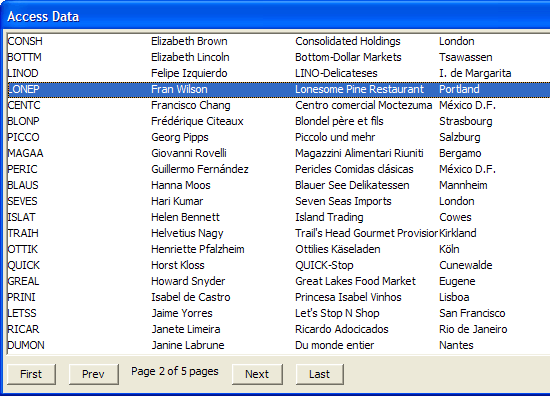
Example
Using the A5_ADO_TO_ARRAY() function is easier for users who do not have a lot of experience using ADO.
ado.MdbFileName = find_Northwind()'Returns the filename of the Northwind.mdb file on this computer.
'If northwind.mdb not found, then prompt user to download it.
if ado.MdbFilename = "failed" then
    end
end if
Make sure the Northwind database file is available and has been selected.
dim xxx as P
dim data as C
dim recordMsg as C
dim indx as N
ado.sql = "SELECT CustomerID, ContactName, CompanyName, city FROM Customers ORDER BY ContactName"
do.Rows = 20
do.Page = 1
if file.filename_parse(ado.MdbFilename,"Ne") <> "northwind.mdb" then
    ui_msg_box("Error","You have not selected the Northwind.MDB file.")
    end
end if
if file.exists(ado.mdbfilename) = .f. then
    ui_msg_box("Error","The specified file was not found: " + ado.mdbfilename)
    end
end if
Display a multi-column list box 150 characters wide, with 6 columns each 25 characters wide. The buttons are selectively enabled or disabled based on the values of the info.currentPage and info.TotalPages variables returned by the previous call.
data = ""
recordMsg = ""
indx = 1
ui_dlg_box("Access Data",<<%dlg%
{startup=init}
%O={@@}%.150,25indx^#data;
1> 1> {text=20,1:recordMsg}
;
%dlg%,<<%code%
Add the event handlers for the navigation buttons. Passing LOCAL_VARIABLES() allows the receiving get_data() function to populate the local xxx dot variable. The data returned is controlled by the do.page variable.
if (a_dlg_button = "init") then
    a_dlg_button = ""
    get_data(local_variables())
end if
if (a_dlg_button = "next") then
    a_dlg_button = ""
    do.page = do.page + 1
    if (do.page > xxx.info.totalPages) then
        do.page = xxx.info.totalPages
    end if
    get_data(local_variables())
end if
if (a_dlg_button = "prev") then
    a_dlg_button = ""
    do.page = do.page -1
    if (do.page < 1) then
        do.page = 1
    end if
    get_data(local_variables())
end if
if (a_dlg_button = "first") then
    a_dlg_button = ""
    do.page = 1
    get_data(local_variables())
end if
if (a_dlg_button = "Last") then
    a_dlg_button = ""
    do.page = xxx.info.totalPages
    get_data(local_variables())
end if
%code%)
Add the event handlers for the navigation buttons.
function get_data as v (vars as P)
    with vars
    xxx = a5_ado_to_array(ado, do)
    if xxx.error.HasError = .t. then
        ui_msg_box("Error", xxx.error.errorText)
        exit function
    end if
    data = ""
    for i = 1 to do.rows
        data_i = ""
        for j = 1 to xxx.fields.FieldArray.size()
            ' Put in a tab stop every 1.5 inches
            data_i = data_i + xxx.array.rowi.dataj.initial + "{T="+1.5*j+"}"
        next j
        data = data + data_i + crlf()
    next i
    data = alltrim(data)
    recordMsg = "Page " + xxx.info.CurrentPage +" of " + xxx.info.TotalPages + " pages"
    indx = indx
    end with
end function