Button O Directive
Syntax
%O= [ {J= A } ] Text [ {I= N } ] Text %
Arguments
- {J= A }
Character. Optional. Label justification. "C" = centered
- Text
Character. Button label text.
- {I= N }
Numeric. Optional. Sequence number of image previously specified by a %I= Image_Name % directive. Inserted at any position.
Description
The O directive allows you to specify the formatting of a button's label. When you have multiple directives in a Format string, you separate them with semi-colons ";".
Example
result = ui_dlg_box("Bitmap and Text on a Button",<<%dlg%
File: [.64filename];
{lf};
<%I=$a5_save;O= {I=1} Save File ; %15,1.5Save a file to disk!save_file>
<10,1.5Close>
%dlg%,<<%code%
if a_dlg_button = "save_file" then
ui_msg_box("Notice","Save File button was pressed")
a_dlg_button = ""
end if
%code%)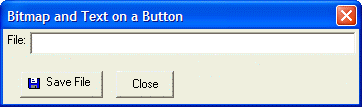
See Also