Light Weight List – Row Prefix
Description
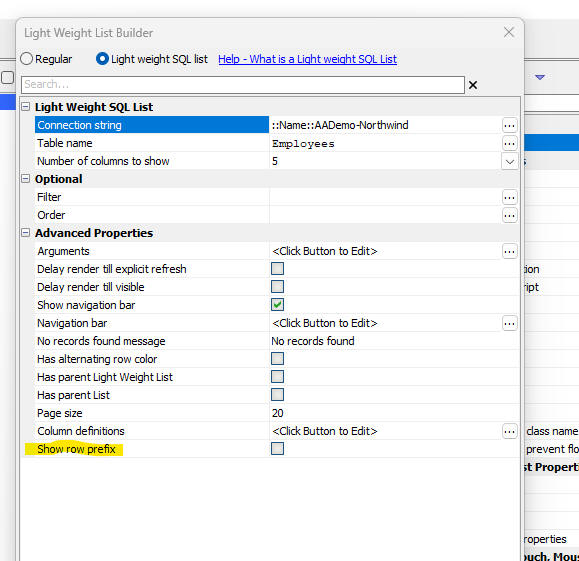
The Row Prefix option in a Light Weight List controls how special row states (dirty, deleted, new, error) are indicated in the UI. You can turn the row prefix on or off to change how these states are displayed.
Overview
By default, a Light Weight List uses a row prefix area to show icons or indicators for row state. When the row prefix is enabled, each row includes a prefix region that can visually mark rows that have been edited, added, deleted, or that contain errors.
You can turn off the row prefix so that special row states are indicated using background colors instead of prefix icons.
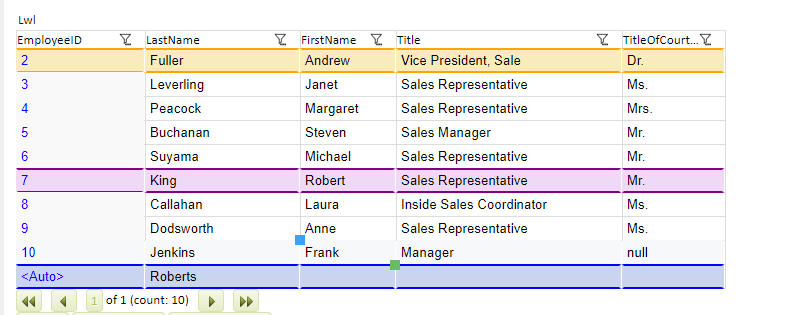
Row state indicators when Row Prefix is off
When you turn off the row prefix, special row states are still clearly indicated, but instead of prefix icons, the rows use background colors to show their status. Different background colors can be used for dirty rows, deleted rows, new rows, and rows that contain errors.
The image below shows how row states are displayed with background colors when the row prefix is disabled.
See Also