ListView Control on MDI Xdialog
Description
This Xdialog box script displays a MDI child window with a List View control in it. The script assumes that you have created a toolbar named MDI_test, and a menu named MDI_test.
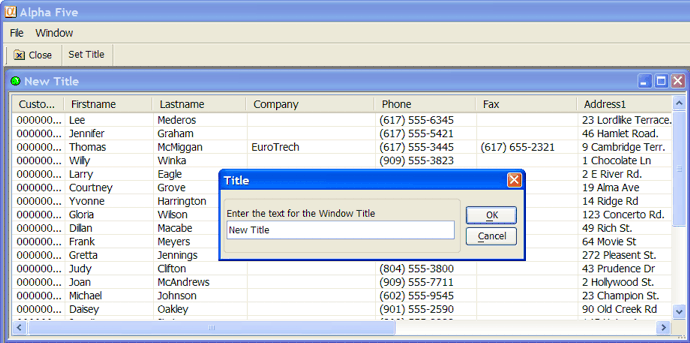
The toolbar should have at least two buttons named "Set Title" and "Close". The event for the "Set Title" button should be "Internal Action" and the event name should be "set_title". The event for the "Close" button should be "Close". The menu has two commands, File > Set window title, and File > Close. The xdialog menu string for this menu is:
File|{DATA=command:set_title}Set window title
File|{DATA=command:close}Close window
Notice that the menu action for each of these menu items is the same as for their corresponding action in the toolbar. This script shows that it is possible to launch multiple instances of the MDI child window. Each instance operates independently of the other. The key to the way in which the toolbar and menu events get executed is the function ((|#event_handler|command()))defined at the end of this script. This function sends the events to the Xdialog box.
title_var_name = "title_var"+stritran(time(),":","_")
eval(title_var_name) = "Dialog Title"
dlg_title = "@="+title_var_name
We register a new MDI window class with A5_MDI_WINDOWCLASS_ADD() so that it appears in the Window menu and the Window menu bar. This function takes three arguments: the class name, the class description, and the class icon.
a5_mdi_windowclass_add("mymdiclass","My Special MDI Window Type","A5_ball_green")This is the event handler string for the top menu.
dim event_string as C
event_string = <<%code%
if left(a_command,3) = "A5." then


a5.command(substr(a_command,4) )

a_command = ""
else if left(a_command,1) = "!" then


evaluate_template(substr(a_command,2) )

a_command = ""
else if left(a_command,6) = "addin:" then

evaluate_template(substr(a_command,7) )
else if left(a_command,8) = "command:" then

ui_dlg_event(dlg_title,substr(a_command,9) )
else if .not. ("|" $ a_command) then

this.command(a_command)

a_command = ""
end if
%code%
dim menu_string as C
menu_string = a5_menu_def_load("MDI_test")
dim toolbar_string as P
toolbar_string = a5_toolbar_def_load("mdi_test")
dim message as C
message = "This is a standard MDI child window. It can be maximized, minimized, resized, or restored."
Here is where we define the ListView control. The code shown here was originally generated by Action Scripting (choose the "Display an Xdialog Box" action and place a ListView control on the Xdialog). When the ListView control is hosted in a MDI window the lv variable must be a local variable. After the Action Scripting code was converted to Xbasic the shared keyword was removed.
DIM lv_FuncCode as C = <<%CodeFunctions%
FUNCTION DoSort as V (byref CurrentSortField as C, byref CurrentSortDirection as C, NewSortField as C,

Filter as C, pLV as P, rs as P )
DIM cResult as C
DIM SortDirection as C
DIM SortField as C
IF NewSortField = CurrentSortField
' clicked on same field, reverse sort

IF CurrentSortDirection = "D"

CurrentSortDirection = "A"

ELSE

CurrentSortDirection = "D"

END IF
ELSE

CurrentSortField = NewSortField

CurrentSortDirection = "A"
END IF
SortDirection = CurrentSortDirection
SortField = CurrentSortField
IF SortDirection = "D"

SortField = "invert(" + SortField + ")"
END IF
' actual sorting code goes here
pLV.RowView.Close()
pLV.RowView = rs.OpenView(1, SortField, Filter)
DoSort = cResult
END FUNCTION
%CodeFunctions%
DIM lv_Funcs as P = compile_template(lv_FuncCode)
DIM lv as C
DIM lv_CurrentSortField as C = ""
DIM lv_CurrentSortDirection as C = "A"
DIM lv_Filter as C
DIM lv_pTableDef as P
DIM lv_pTableDef.ReturnValueExpression as C = "Customer_id"

DIM lv_pTableDef.FieldList as C = <<%txt%
Customer_id
Firstname
Lastname
Company
Phone
Fax
Address1
Address2
City
State
Zip
%txt%
DIM lv_pTableDef.TitleRow as C = "{AUTOSIZE}Customer_id|{AUTOSIZE}Firstname|{AUTOSIZE}Lastname|{AUTOSIZE}Company|{AUTOSIZE}Phone|{AUTOSIZE}Fax|{AUTOSIZE}Address1|{AUTOSIZE}Address2|{AUTOSIZE}City|{AUTOSIZE}State|{AUTOSIZE}Zip"
DIM lv_pTableDef.TableName as C = "clients"
DIM lv_pTableDef.Filter as C = "(recno()> 0)" ' recno()> 0 is required in order to avoid showing deleted variables
DIM lv_pTableDef.Order as C = ""
lv_pLV.titlerow = lv_pTableDef.titlerow
lv_pLV.titleevents = "lv_Sort_Customer_id|lv_Sort_Firstname|lv_Sort_Lastname|lv_Sort_Company|lv_Sort_Phone|lv_Sort_Fax|lv_Sort_Address1|lv_Sort_Address2|lv_Sort_City|lv_Sort_State|lv_Sort_Zip"
lv_pLV.style = "report,singlesel,showselalways,gridlines,fullrowselect"
lv_pLV.dragbehaviour = ""
lv_pLV.dropbehaviour = ""
DIM lv_t as P
DIM lv_rr as Alpha5::RowRelation
DIM lv_rs as P
IF .NOT. file.exists(table.filename_get(lv_pTableDef.TableName))

END
END IF
lv_t = table.open(lv_pTableDef.TableName, FILE_RO_SHARED)
lv_t.persist()
lv_rs = lv_rr.TableToRowSource(lv_t)
lv_Filter = lv_pTableDef.Filter
lv_pLV.rowview = lv_rs.OpenView(1,lv_pTableDef.Order,lv_Filter)
lv_pLV.RowSeparator = crlf()
lv_pLV.ColumnSeparator = "|"
lv_pLV.Key = lv_pTableDef.ReturnValueExpression
lv_pLV.Columns = lv_pTableDef.FieldList
lv_pLV.events = <<%code%

function OnRightClick as c(lv as p,listView as p,args as  p)
WITH lv

listView.Selection = listView.GetRowValue(args.GetClickRow() )

onselectionchanged(lv, listView )

'to call a function outside the events code, you must use the ui_dlg_eval() function

'menu = ui_dlg_eval(dlg_title,"a5wcb_PublishRclick(selectedFilename)")
END WITH
end function

function OnDoubleClick as c(lv as p,listView as p,args as  p)
WITH lv

lv

= listView.GetRowValue(args.GetClickRow() )
END WITH
end function

FUNCTION onselectionchanged as V (lv as P, listView as p )
WITH lv

lv = listView.Selection
END WITH
END FUNCTION

FUNCTION onkeydown as v(vars as p,listView as p,args as p)
DIM key as C
Dim KeyName as C
key = args.GetKeyName()
KeyName = key
IF key = "{Delete}" .OR. key = "{Num Del}"

KeyName = "{Delete}"
ELSE IF args.keycode = 13 ' enter

KeyName = "{Enter}"
ELSE IF args.keycode = 8 ' backspace

KeyName = "{Backspace}"
END IF
END FUNCTION
%code%
This ends the definition of the ListView control. In the Xdialog, we have added the {stretch} command so that the ListView changes size when the MDI window is resized.
ui_modeless_dlg_box(dlg_title,<<%dlg%
{icon=A5_ball_green}
{mdichild=mymdiclass}
{stretch=height,width}
{listviewvirtual=150,20lv^=lv_pLV};
{watch=lv!foo};
{on_activate=activate}
{on_deactivate=deactivate}
%dlg%,<<%code%
if a_dlg_button = "set_title" then
title = ui_get_text("Title","Enter the text for the Window Title")
if title <> "" then
eval(title_var_name) = title
end if
end if
if a_dlg_button = "activate" then
'show the toolbar
dim pDummy as p
pDummy.dummy = ""
toolbar_name = a5_system_toolbar_show(pDummy,toolbar_string)
'show the menu. the ui_expand_branches() function is used to expand certain menu 'macros' (such as recent file list, or window list) at runtime.
ui_top_menu(ui_expand_branches(menu_string),event_string)
end if
if a_dlg_button = "deactivate" then
'before closing the toolbar we check to see if it still exists -- the user could have undocked the toolbar and closed it before closing the dialog box.
if ui_modeless_dlg_exist(toolbar_name) then
ui_modeless_dlg_close(toolbar_name)
end if
end if
if a_dlg_button = "title_change" then
eval(title_var_name) = title
end if
if a_dlg_button = "close" then
ui_modeless_dlg_close(dlg_title)
end if
IF left(a_dlg_button, len("lv_Sort_") ) = "lv_Sort_"
DIM NewSortField as C
NewSortField = substr(a_dlg_button, len("lv_Sort_")+1)
lv_Funcs.DoSort(lv_CurrentSortField, lv_CurrentSortDirection, NewSortField, lv_Filter, lv_pLV, lv_rs)
a_dlg_button = ""
END IF
IF a_Dlg_button = "lv_refresh"
a_dlg_button = ""
lv_pLV.RowView.Close()
lv_pLV.RowView = lv_rs.OpenView(1, lv_CurrentSortField, lv_Filter)
END IF
IF a_dlg_button = "foo"
a_dlg_button = ""
' do nothing
END IF
%code%)
This is the event handler for the toolbar.
FUNCTION command as v (
vars as p,command as c ) '
with vars
if left(command, 6) = "event:" then
command = substr(command,7)
end if
ui_dlg_event(dlg_title,command)
command = ""
end with
END FUNCTION
Limitations
Desktop applications only
See Also