Enabled Syntax
Syntax
? Enabled
Arguments
- Enabled
Character. The name of a logical variable or an expression that evaluates to .T. (TRUE) or .F. (FALSE).
Description
Entered code that analyzes the value of the a_dlg_button variable and responds accordingly.
Discussion
The event syntax gives the programmer the opportunity to write Xbasic code in the %code% section of the Xdialog that analyzes the value of the a_dlg_button variable and responds accordingly.
Example
For example, in the following script the list box is enabled.
dim on_off as L
on_off = .T.
mode = 1
choices = <<%dlg%
Shared
Read only
Exclusive
%dlg%
result=ui_dlg_box("Title",<<%dlg%
Filename:| [.32filename];
Open as:;
Mode:| [.10,5mode^#choices?on_off];

%dlg% )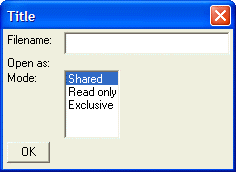
Changing the value of on_off disables the list box.
dim on_off as L
on_off = .F.
mode = 1
choices = <<%dlg%
Shared
Read only
Exclusive
%dlg%
result=ui_dlg_box("Title",<<%dlg%
Filename:| [.32filename];
Open as:;
Mode:| [.10,5mode^#choices?on_off];

%dlg% )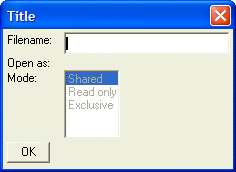
See Also